A bot for Minibia · Tibia OT
Your character keeps hunting.
Even when the game asks who you are.
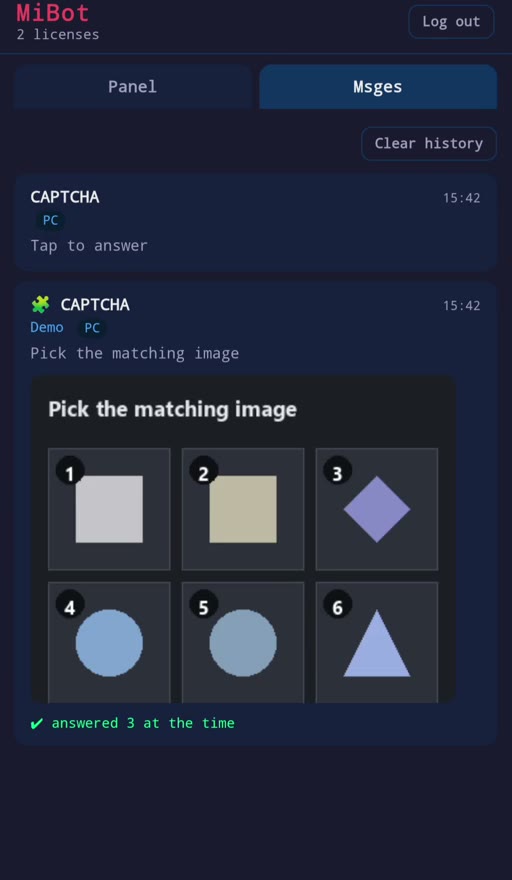
MiBot is a Minibia bot that walks the route, picks the targets, heals, loots and makes runes. When the anti-bot captcha appears it answers the ones it already knows — and the ones it does not, it sends to your phone.
Windows · one licence, one machine · updates install themselves
Two videos
Watch a session run itself.
Recorded from a real client: the captcha answered, the route walked, the targets picked, and a tour of every tab you get.
Overview · 1:36 · no sound needed · watch on YouTube
Cavebot presentation · 4:49 · no sound needed · watch on YouTube
The part that ends most sessions
An unanswered captcha is a dead character.
Every other feature is worth nothing if the server asks a question at 3am and nobody answers it. It is the one thing that separates a Minibia bot that survives a night from one that does not, so it is the part MiBot takes most seriously.
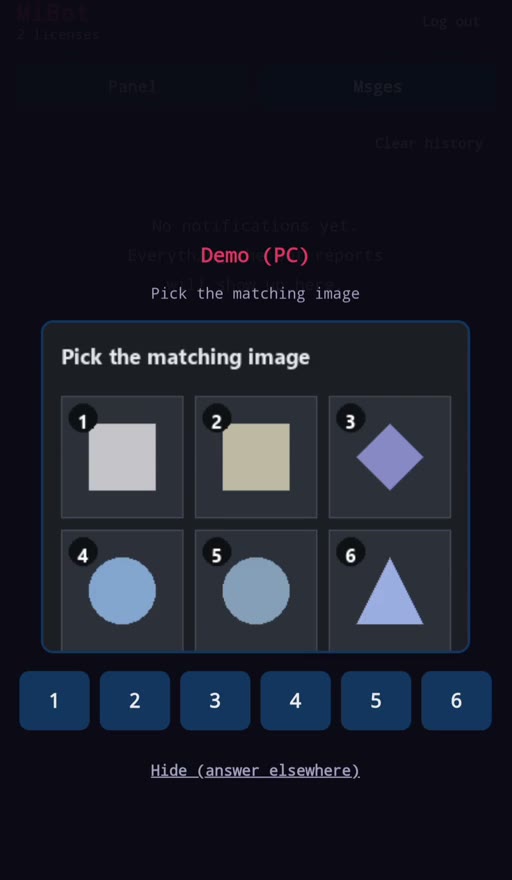
- It recognises the puzzle. A captcha is identified by its set of six images, independent of the order they are shown in — so the same puzzle is recognised however it is shuffled.
- Seen it before? It answers itself. Answers are shared between users and only trusted after they have been confirmed more than once, so one wrong tap cannot teach everybody the wrong thing.
- Never seen it? It reasons. A category model works out which of the six images is the odd one out. It can be switched off if you would rather it never guess.
- Still unsure? Your phone rings. The tiles arrive numbered. You tap a number. The bot clicks it in game.
What is in it
Two tiers. The same programme.
Tier 1 keeps a character alive and working. Tier 2 adds the parts that move it around the map and decide what it fights. Upgrading is a remote change to your key — no reinstall, no second download.
Healing, supplies, professions, alerts
Healing & mana
- four HP tiers, UH rune separate from spells
- mana potion on its own cooldown
- mana training at lowest priority
- food on a timer
- hotbar preset
Rune Maker
- makes runes while you hunt
- equipment and escape handling
- auto ring from a position or container
Fishing & Mining
- unattended fishing
- mining, including rock soil
Alerts
- phone notification on captcha, death, low HP
- per-supply thresholds: UH, mana, runes
- reactions to an admin appearing
- local alerts with no phone and no network
Humanize
- varies timing against pattern detection
Chrome & Log
- launches the browser already configured
- finds your tab by character name
- every action, timestamped
Everything in Tier 1, plus the map and the fight
Cavebot
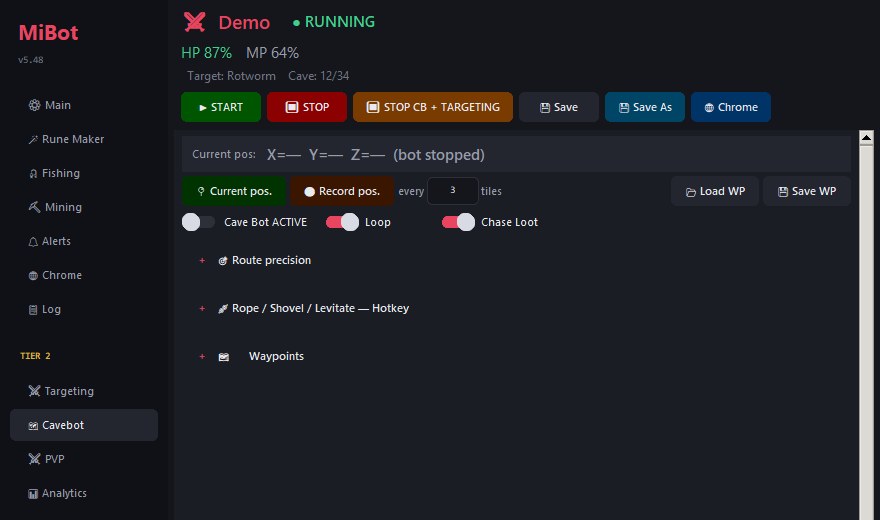
- recorded waypoint routes, looping
- rope, shovel and levitate
- route precision per leg
- walks to the loot it made
- pauses when a player comes close
Targeting
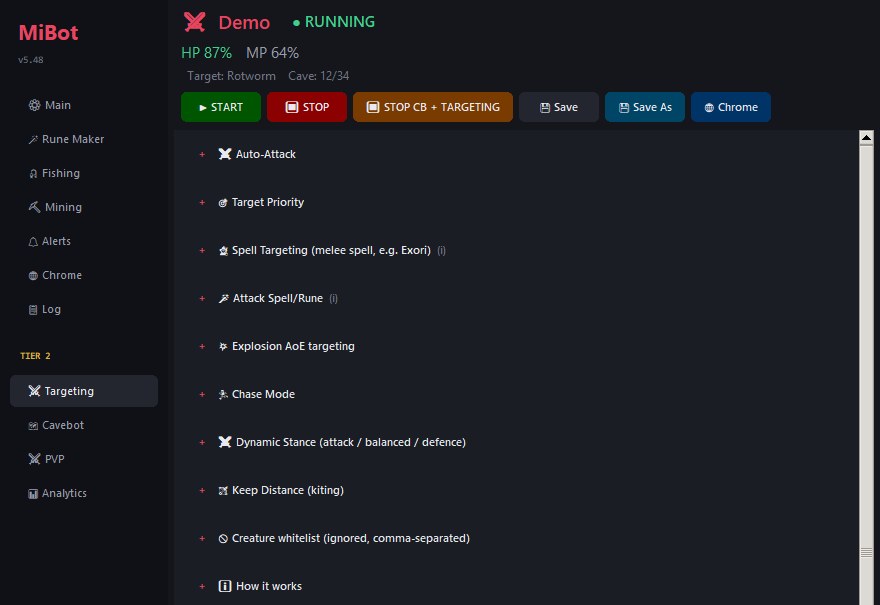
- target priority and creature whitelist
- lure: gathers a pack before committing
- explosion AoE picks the best tile
- area spell with a creature-count gate
- chase mode, keep distance, kiting
- dynamic stance: attack / balanced / defence
PVP
- anti-paralyze
- auto magic shield and haste
- auto ring and amulet from any open container
- HP-triggered ring, swapped back when safe
Analytics
- exp/h, kills/h, time to next level
- loot split into gold and items
- supply waste counted per item
- net profit per hour, after supplies
The interface
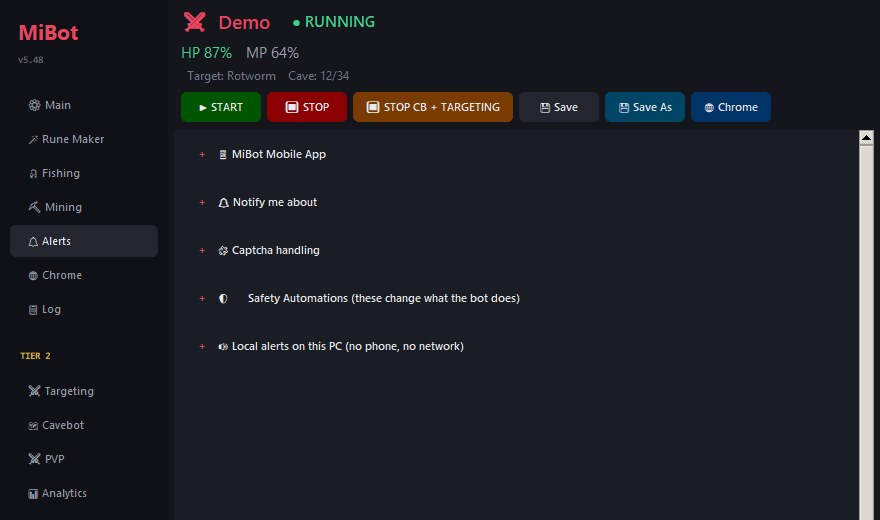
Every setting where you would look for it.
Sections stay collapsed until you open them, so a tab is a list of what it can do rather than a wall of fields.
How access works
A key, a machine, and no maintenance.
One licence, one machine
Your key binds to the computer you activate it on. Moving it is a manual change, not something that happens by accident.
Works offline for a week
After one successful check the programme runs for seven days without reaching the licence server, so a network problem is never a lost night.
Updates install themselves
New versions are downloaded and verified by checksum at launch. There is nothing to re-download by hand and no installer to run.
Upgrade without reinstalling
Tier 1 to Tier 2 is a change to your key, applied remotely. Restart the programme and the extra tabs are there.
The phone app is a web page
Nothing to install from a store. Open the link, log in with the same key, add it to your home screen and allow notifications.
Multiple characters
One profile per character, one browser tab each. The phone app shows them all and starts or stops any of them.
Pricing
Two tiers.
Tier 1
$10/month
- Healing, mana, food, hotbars
- Rune Maker
- Fishing and Mining
- Alerts and captcha handling
- Phone app
- Cavebot
- Targeting
- PVP and Analytics
Tier 2
$15/month
- Everything in Tier 1
- Cavebot with waypoint routes
- Targeting, luring and AoE
- PVP automations
- Analytics and profit tracking
- Upgrade any time, no reinstall
Both tiers are activated by hand. Message us and you get your key — the same key upgrades from Tier 1 to Tier 2 later without reinstalling anything.
Get in touch
Contact
Keys are issued by hand, so there is a person on the other end of all three of these. Take whichever suits you — a trial of the bot costs nothing and needs no card. Minibia is an open Tibia server, and MiBot is built for it specifically.
Join the Discord
Announcements, changelogs and other users. Public — good for the questions you do not mind other people reading.
Open the serverAsk for a trial by email
Leave your address and I will write back with a trial key.
Read it before you buy
Instruction
The complete manual, written for someone who has never run a bot before: every window, every tab, every setting, with a screenshot of each one. Nothing is held back for paying customers — if a feature is confusing, you can find that out now rather than after paying.
- Quick start, in seven steps
- Licence keys, Tier 1 vs Tier 2
- Several characters and the HUD bar
- Connecting to the game through Chrome
- Healing, mana, rings and escape
- The phone app, set up step by step
- How the captcha is answered
- Targeting: the Attacks table, lure, keep distance
- Cavebot routes, waypoints, rope and shovel
- Refill: depot trips, named bags, Sort Loot
- PVP: haste, shield, HP ring and amulet
- Analytics, Radar, troubleshooting and FAQ
Download MiBot
Windows, no installer — one file you double-click. It updates itself from then on, so this is the last time you download anything by hand.
You can install and open it without a key. A licence is what makes it run — ask for a trial above and you will have one the same day.
Questions
Before you buy.
Can I be banned for using it?
Yes. Automation is against the rules of the server, and anybody who tells you otherwise is selling you something. MiBot reduces the two things that actually get people caught — an unanswered captcha and obviously mechanical timing — and it warns you when an administrator appears. It cannot make the risk zero, and it does not claim to.
Does it read the screen?
No. It reads the game client's own state through the browser and sends its actions the same way the client does. Nothing depends on your resolution, your window size or where you leave the mouse.
Do I have to leave my computer on?
Yes — the programme runs on your machine alongside the browser. What you do not have to do is sit in front of it.
What happens when a captcha appears and I am asleep?
If the puzzle has been seen and confirmed before, it is answered without you. If it has not, your phone gets a notification with the tiles numbered. If you never answer, the bot stops rather than guessing.
Can I run more than one character?
Yes. One profile and one browser tab per character. The licence is per machine, so characters on the same computer are covered.
Mac or Linux?
Windows only.
Get started